LATEST TREND IN TECHNOLOGY, FREE TECHNOLOGY, COMPUTER AND MOBILE TIPS.

Showing posts with label Apple iPhone. Show all posts

Monday, 4 December 2023

How to unlock icloud locked iphone free

Introduction:

The Activation Lock, a security feature embedded by Apple, serves as a robust defense against unauthorized access to iPhones, iPads, and other Apple devices in the event of loss or theft. Activated when Find My iPhone is enabled, it acts as a shield for the device's information and data. While this feature is pivotal for device security, it can pose challenges for those who find themselves with a device still linked to a previous owner's Apple ID, requiring the owner's cooperation to officially remove the Activation Lock.
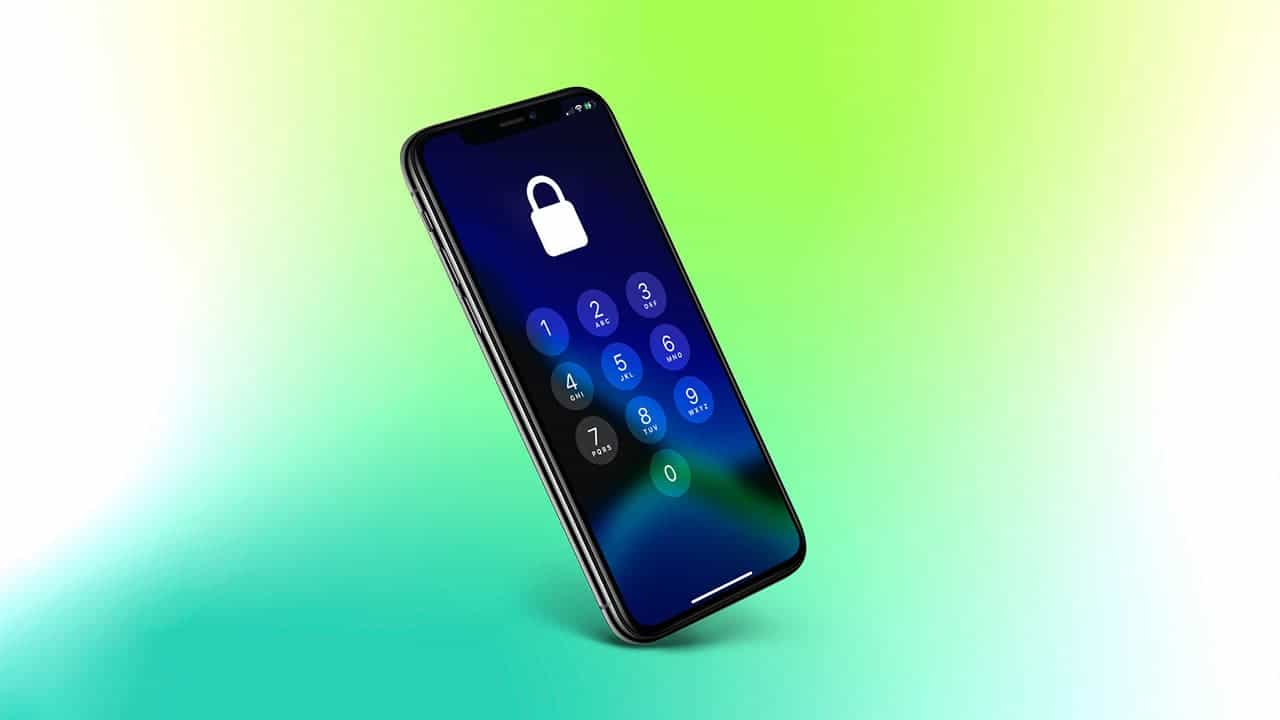


Understanding "iPhone Locked to Owner":

The term "iPhone Locked to Owner" refers to Apple's Activation Lock, connecting a device to a specific iCloud account owned by the device's proprietor. Activation Lock safeguards the device and personal information by preventing unauthorized access. If you encounter an iPhone locked to its owner, it displays an "iPhone Locked to Owner" screen, necessitating the owner's iCloud credentials for unlocking.

Official Methods vs. Unofficial Bypass:

The sanctioned approach to remove the Activation Lock involves providing the password to the linked iCloud account. However, unofficial methods, like using third-party tools, have emerged to bypass the Activation Lock without the previous owner's involvement. Tools like AnyUnlock offer an alternative by remotely removing the device from the previous owner's Apple ID through iCloud.


What Does iPhone Locked to Owner Mean?

The term signifies Apple's Activation Lock, securing a device to a specific iCloud account owned by the device's user. Activation Lock prevents unauthorized access, requiring the owner's iCloud credentials to unlock the device fully. While encountering an iPhone locked to its owner, it is crucial to respect the owner's privacy and data security.

Bypassing Activation Lock with AnyUnlock: A Step-by-Step Guide

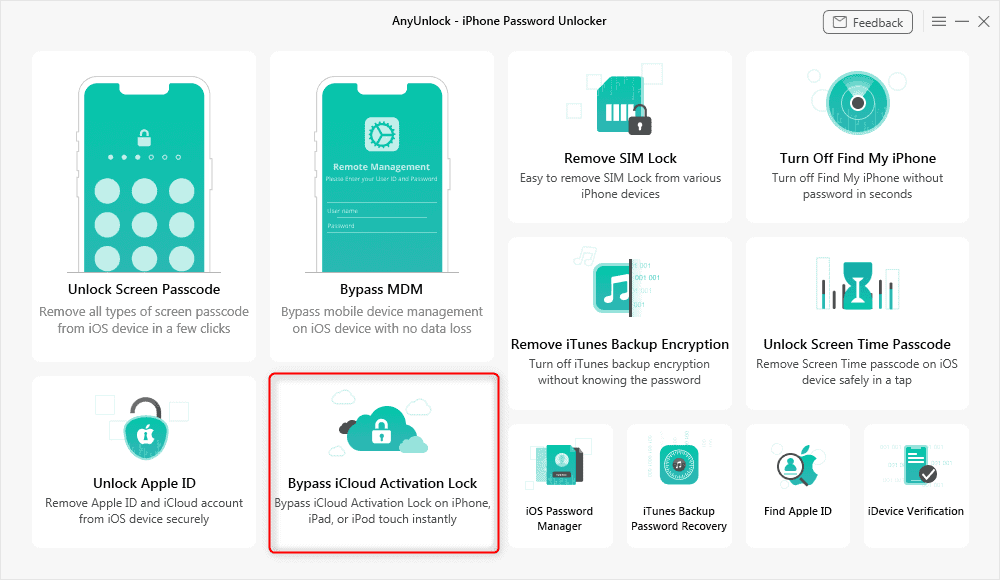
AnyUnlock – iPhone Password Unlocker stands out as a top-tier iCloud bypass tool for iOS devices in 2023. Offering a comprehensive iOS unlocking toolkit, AnyUnlock can address various unlocking needs, including circumventing iCloud Activation Lock without Apple ID or Apple ID password. Here's a guide on how to utilize AnyUnlock:


Features of AnyUnlock:

  • Swift removal of iCloud activation lock on iPhone, iPad, or iPod touch.
  • Checking the unlock status when purchasing a used iPhone or iPad.
  • Locating the associated Apple ID or signing out of the current Apple ID.
  • Cracking various iOS screen locks using numerical passwords, PIN, Face ID, or Touch ID.

Steps to Bypass iCloud Activation Lock on Mac using AnyUnlock:

  1. Download AnyUnlock – iCloud Bypass Tool (compatible with Windows & Mac).
  2. Install and launch the tool, then choose "Bypass iCloud Activation Lock."
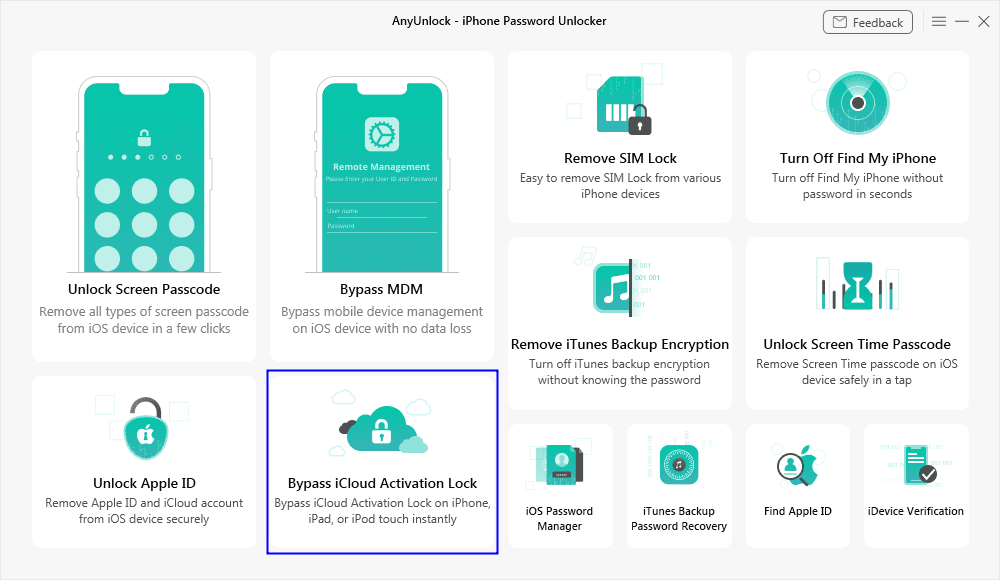
  3. Connect your iOS device to the computer and click "Start Now."

  4. Confirm your iOS device's information as guided on the screen.

  5. Place your iOS device into DFU mode to initiate the jailbreaking process.

  6. Once the jailbreak completes, click "Bypass Now" to start bypassing iCloud Activation Lock.
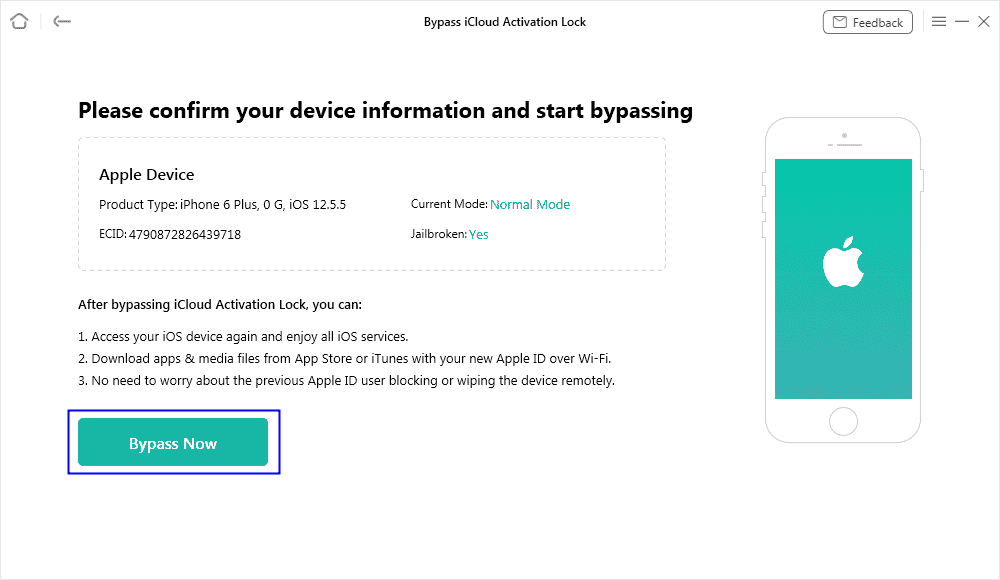
  7. Wait for the process to finish, and the interface will confirm the removal of iCloud activation lock from your iOS device.
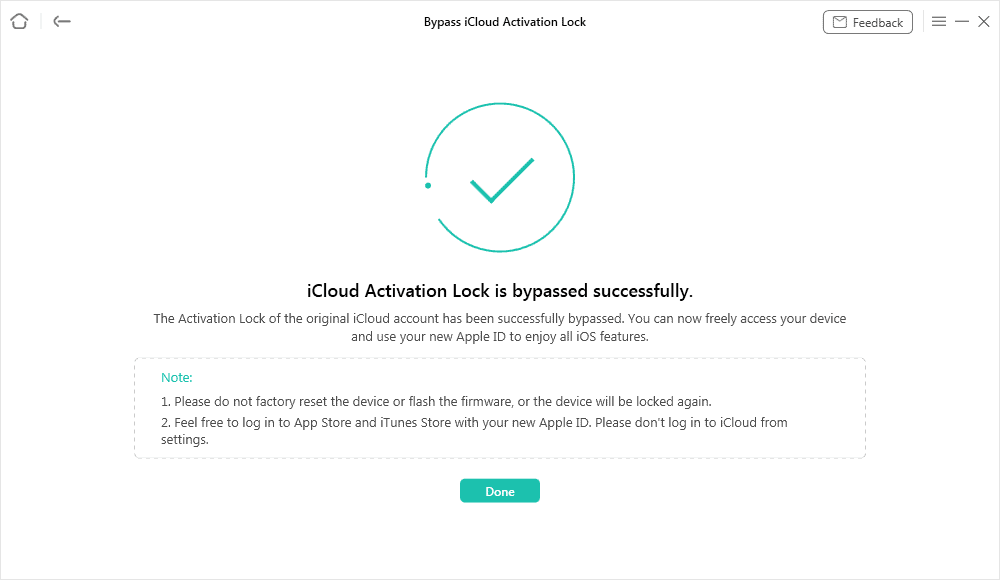
NOTE "After a successful jailbreak of your iOS device, certain functionalities may become inaccessible. The jailbreaking process will deactivate the ability to make phone calls, use cellular data, initiate FaceTime calls, send iMessages, and more. It's important to note that any attempts to reset or upgrade the device can result in relocking the iOS device. Please refrain from logging into iCloud through the Settings on your iPhone, iPad, or iPod touch, and avoid factory resetting your device, as these actions can lead to the device being locked once again."

Remove iPhone Locked to Owner via iCloud (Apple ID Required):

Here's a step-by-step guide on removing an iPhone locked to an owner via iCloud, requiring the associated Apple ID:

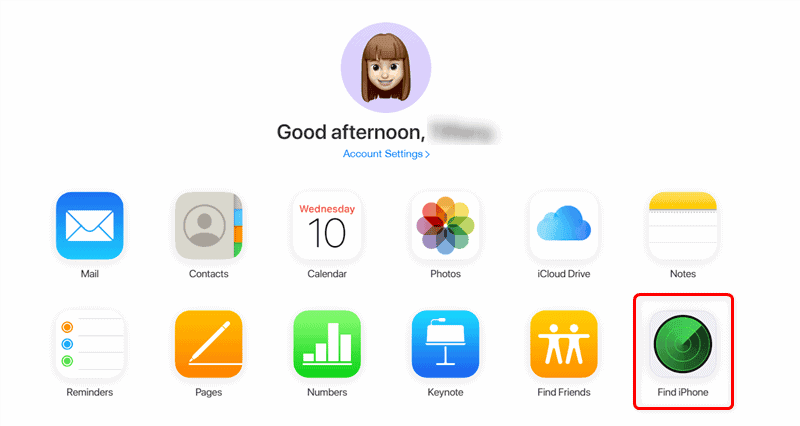
  1. Sign in to iCloud.com using the Apple ID and password linked to the locked iPhone.
  2. Navigate to "Find My iPhone."
  3. Choose the device to remove from iCloud.
  4. Click "Remove from Account."
  5. Confirm the action by clicking "Remove."

Following these steps removes the activation lock, enabling you to set up the iPhone using a new Apple ID. If contacting the previous owner is not feasible, alternatives include using third-party tools or erasing and setting up the device as new.

iPhone Locked to Owner Bypass Without Apple ID and Passcode:

AnyUnlock – iPhone Password Unlocker serves as a reliable tool for bypassing Activation Lock without Apple ID or passcode. However, other methods exist, such as DNS bypass. Here's a guide:

  1. Set up your iPhone as a new device until you reach the Wi-Fi settings page.
  2. Connect to Wi-Fi and tap the eye icon next to your network name.
  3. Tap "Configure DNS" and choose the manual option.
  4. Enter one of the following DNS values:
    • DNS1: 192.168.1.1
    • DNS2: 192.168.1.2
    • DNS3: 192.168.1.3
  5. Proceed, and you will reach the unlock screen.

Note: This method may require multiple attempts for success.

iPhone Locked to Owner Unlock Without PC Using Passcode:

Unlocking an iPhone locked to an owner without using a PC and a passcode can be attempted through various methods:

  1. Reset from the Lock Screen:
    • Enter the passcode five times.
    • Wait for the temporary lockout.
    • Ensure the device is connected to Wi-Fi.
  2. Use Find My on Another Device:
    • Launch Find My on a compatible device.
    • Select the locked iPhone.
    • Tap "Erase this device" and confirm with your Apple ID password.
  3. Activate Siri:
    • Activate Siri by saying "Hey Siri" or clicking the Home button.

Note: Success with these methods may vary and may require multiple attempts.

Contacting Apple Support to Unlock iPhone:

If unlocking an iPhone locked to an owner without using a computer is your goal, contacting Apple Support is an option. However, Apple Support may redirect you to the carrier for unlocking. Here's what you can do:

  1. Contact your carrier to unlock the iPhone.
  2. If needed, contact Apple Support and submit a support request with proof of purchase.
  3. Remove Activation Lock on the web by going to iCloud.com/find.

Conclusion:

Encountering an iPhone locked to an owner can be frustrating, but solutions exist. While unofficial methods like DNS bypass may work, they aren't foolproof. However, AnyUnlock – iPhone Password Unlocker, a third-party tool, stands as a reliable iOS unlocking toolkit that works consistently. Remember to respect privacy and security, exhaust all possible means of contacting the previous owner, and use official methods whenever possible. Whether you seek to unlock an iPhone locked to an owner via iCloud or without a PC, the methods provided offer a comprehensive guide to navigate this challenge.

Share:

Thursday, 19 January 2023

Best Cell Phone (Smartphone) To Buy in 2023.


Are you in the market for a new cell phone? With so many options available, it can be overwhelming to decide which one to buy. 


In this blog post, we'll take a look at some of the best cell phones currently available, and break down their features, specifications, and price points to help you make an informed decision. We'll cover a range of options, from budget-friendly models to high-end flagship devices, so whether you're a casual user or a power user, there's something here for everyone. So, whether you're looking for a phone with a great camera, a large battery, or the latest technology, read on to discover the best cell phone to buy.

1. SAMSUNG Galaxy S21 FE 5G Cell Phone, Factory Unlocked Android Smartphone.

TheSamsung Galaxy S21 FE 5G is an exceptional smartphone that offers a premium experience at a more affordable price point. The 120Hz display screen is one of the standout features of this device, providing smooth and responsive navigation that makes scrolling through apps, playing games, and streaming videos a breeze. The display is also bright and crisp, making it easy to view in any lighting conditions.

The pro-grade camera is another highlight of this device. With a triple-lens setup, it allows for stunning photography and video capabilities. The camera takes sharp and detailed photos with accurate color reproduction, and the low-light performance is impressive as well. With features such as Night mode, Pro mode, and the ability to shoot 8K videos, this camera is sure to impress even the most demanding photography enthusiasts.

The all-day intelligent battery is a huge plus, ensuring that the phone will last even the longest of days. With the ability to quickly charge, the phone can be back to full power in no time, and the option of wireless charging, it makes it even more convenient. Additionally, the 128GB of storage is more than enough to store all of your apps, photos, and videos.

TheSamsung Galaxy S21 FE 5G is also 5G-enabled, which means you can take advantage of the faster download and upload speeds offered by 5G networks. This is especially useful for streaming high-quality videos and playing online games.

Overall, the Samsung Galaxy S21 FE 5G is an outstanding smartphone that offers a premium experience at a more affordable price point. With its high-performing specs, feature-packed camera, and all-day intelligent battery, it's a great option for anyone looking for a high-performing, feature-packed smartphone without breaking the bank. 

Please check it out below


2.iPhone 13 Pro, 512GB - Unlocked (Renewed Premium)

The iPhone 13 Pro with 512GB of storage and unlocked for use with any carrier is a fantastic option for those looking for a high-performance, premium smartphone experience. The renewed premium status of this device ensures that it has been thoroughly inspected and tested to ensure it is in like-new condition, so you can be confident in your purchase.

The Pro model of the iPhone 13 offers advanced camera capabilities, including a triple-camera system with 12MP ultra-wide, wide, and telephoto lenses, as well as night mode, deep Fusion, and ProRes video. The A15 Bionic chip provides lightning-fast performance and the ability to handle even the most demanding apps and tasks.

The large 512GB of storage allows for plenty of space to store all of your photos, videos, and apps without worrying about running out of space. The 5G capability ensures that you will have access to lightning-fast download and streaming speeds.

In addition, the iPhone 13 Pro features an all-new Ceramic Shield front cover, offering four times better drop performance and the toughest glass ever in a smartphone.

Overall, this renewed premium iPhone 13 Pro 512GB  is an excellent choice for anyone looking for a high-performance, premium smartphone experience.


3. Google Pixel 7-5G Android Phone - Unlocked Smartphone

The Google Pixel 7 5G is an excellent Android smartphone that offers a lot of features in a compact and sleek design. The unlocked version gives you the flexibility to use it with any carrier of your choice.

One of the standout features of the Pixel 7 is its camera. It boasts a wide-angle lens that allows you to capture more of the scene in your photos, and it also has a Night Sight mode that allows you to take great photos even in low-light conditions. The camera also includes features like Portrait Mode, which can blur the background of a photo to make your subject stand out, and Live HDR, which allows you to see the final image's exposure and color before you take the picture.

The Pixel 7 also offers a long-lasting battery life, with up to 24 hours of usage time. This, along with the 5G capabilities, makes this device a great option for those who need a phone that can keep up with their busy lifestyle. The device also comes with 128GB of storage, providing ample space for all of your apps, photos, and videos.

The device is powered by the Qualcomm Snapdragon 870 processor and 8GB of RAM, which ensures smooth and responsive performance. The device also comes with the latest Android version, which means you will have access to the latest features and security updates.

In conclusion, the Google Pixel 7 5G is a great choice for anyone looking for a high-performance, feature-packed smartphone that can keep up with their busy lifestyle. With its long battery life, 5G capabilities, and advanced camera features, it is perfect for those who want a phone that can do it all.

4. SAMSUNG Galaxy Z Flip 4 Cell Phone, Factory Unlocked Android Smartphone, 256GB

SAMSUNGGalaxy Z Flip 4 Cell Phone, Factory Unlocked Android Smartphone, 256GB, Flex Mode, Hands Free Camera, Compact, Foldable Design, Informative Cover Screen

The Samsung Galaxy Z Flip 4 is a cutting-edge smartphone that boasts a unique foldable design and a host of impressive features. The compact form factor makes it easy to take with you on the go, while the foldable design allows for a truly immersive and flexible viewing experience.

One of the standout features of the Galaxy Z Flip 4 is its Flex Mode, which allows you to split the screen in half and use the top portion as a viewfinder while using the bottom portion as a control panel for your camera. This feature makes taking hands-free photos and videos a breeze and allows for new creative possibilities.

The camera itself is also noteworthy, with a dual-lens setup that takes sharp and detailed photos with accurate color reproduction. The low-light performance is impressive as well, allowing you to capture stunning photos even in challenging lighting conditions. The camera also has a host of features, such as Night mode and Pro mode, that allow you to take your photography to the next level.

The 256GB of storage is more than enough to store all of your apps, photos, and videos. Additionally, the informative cover screen allows you to quickly check notifications and control your music without having to fully open the device.

The Samsung Galaxy Z Flip 4 is also 5G-enabled, which means you can take advantage of the faster download and upload speeds offered by 5G networks. This is especially useful for streaming high-quality videos and playing online games.

Overall, the Samsung Galaxy Z Flip 4 is a truly innovative smartphone that offers a unique foldable design, impressive camera capabilities, and a host of other features that make it a standout device. Its compact and portable size and 5G enabled capabilities to make it the perfect smartphone for those who are always on the go.

In conclusion, there are many great cell phone options available on the market. From budget-friendly models to high-end flagship devices, there is something for everyone. It's important to consider your needs and budget when making a decision. If you're looking for a phone with a great camera, a large battery, or the latest technology, there are plenty of options available. Do your research, compare the features and specifications, and read reviews before making a decision. With the right phone, you'll be able to stay connected, capture memories, and enjoy all the features that modern smartphones offer. We hope this post has helped you in your search for the perfect cell phone.


Share:

Monday, 1 August 2016

How to Unlock iCloud Account of Your iPhone/iPad, Bypass iCloud Activation Lock Free.

At the point when Apple disclosed IOS 7 in 2013 it additionally acquainted another security highlight with deflect burglary and find lost and stolen iPhones and iPads. The security highlight was called Activation Lock and until today, has remained a vital part of all forms of IOS firmware.

Activation lock comes when "Find My iPhone" is empowered in iCloud Settings. With this instrument, Apple has these aims:

• Enrolment of your gadget with an Apple ID is an important security measure to recuperate your gadget once it is lost.

• You can utilize the iCloud site or other Apple gadget to wipe out iPhone information remotely.

• You are likewise ready to communicate something specific or tone remotely, alarming the individual with your gadget that it is lost or stolen.

• A hoodlum ought not have the capacity to utilize stolen iPad or iPhone which is connected to a Apple ID.

                STEPS To ByPASS ACTIVATION  LOCK FREE

The uplifting news is that you can sidestep the activation lock in the event that you by one means or another overlooked the Apple ID of your gadget, or acquired one that is appended to another Apple ID obscure to you.

The accompanying strides ought to kick-begin your salvage mission:

• Use Apple Enterprise support or Virtuoso Bar

• Reset Apple ID and watchword if eMail address secret word is known not

• Utilize the eMail Address Designed via the post office application

• Utilize the past owner to sidestep activation lock

• Utilize outsider open administrations(Third party)

1. Contact Apple Undertaking support or Virtuoso Bar


Apple Undertaking support and Virtuoso Bar ought to be the main line of salvage in the event that you have botched up your Apple ID.

Taking after the presentation of Activation Lock, Apple additionally dispatched Device Enrolment Program (DEP) and Apple Configurator for big business support.

The DEP setup which licenses concentrated enrolment of all undertaking iPads and iPhones under Cell phone Administration, is gone for instructive and comparable organizations.
All iDevices are overseen under a director who can remotely debilitate Activation lock if required.

At the point when DEP is sent on an iPhone, it will produce a unique detour code each time its client initiates Discover my iPhone.

Along these lines, the chairman can sidestep any allotted Apple ID and redeploy the iPhone to another client.

A situation where a disappointed worker or runaway student enacts Apple ID, is taken care of under this course of action.

•  DEP - AppleBusiness- Device Enrolment Program

The Device Enrolment Program (DEP) gives a streamlined approach to convey your corporate-claimed iOS gadgets.
The circumstance is diverse when you overlook an individual Apple ID or purchase an iDevice bolted to an Apple ID having a place with another person. The Venture/Genius support does not make a difference in this circumstance and plan of action for you may lie with the colleagues at the Virtuoso Bar.

Just on the off chance that you dwell close to one such bar, say your supplications and stroll in. Make a point to convey verification of procurement, or else you may have disappointing strolls in front of you.

Sadly, even with confirmation of procurement, experience with the Virtuoso/Genius Bar group may not be useful dependably.

At last, you may need to figure out how to reset the Apple ID or make utilization of some different arrangements as clarified beneath.

2. Reset Apple ID and Secret key 

On the off chance that the Virtuoso/Genius Bar is not exactly accommodating and you have overlooked just the Apple ID secret key, the online Apple reset strategy ought to be useful.

Head over to I Forgot Apple ID page and nourish in your points of interest to reset your Apple ID secret key. The robotized framework will help you reset your secret word.

The accompanying are preconditions for you to reset Apple ID online:

• Know the responses to Apple ID security questions.

• Have entry to the email address connected with your Apple ID.

In the event that regardless you recollect the secret key(password) to the email address appended to the Apple ID being referred to, just request that reset the password and you will get an email provoking you to reset the secret key (password). Exceptionally straightforward.

You should simply take after the connection sent to your email and you will have the chance to change your secret word(password). What's more, voila, you will have entry to your Apple ID once more.

On the off chance that you don't have a clue about the secret key to the email address which is related to the Apple ID being referred to, then your fortunes is running out. You might need to attempt the email address choice clarified underneath.

3. Utilize the eMail Address Arranged via the mail Application 


In the event that you have an iPhone whose Apple ID password is obscure to you yet one whose Home screen you can in any case access, utilize the mail application to reset the Apple ID.

Assuming the mail address connected to the Apple ID is dynamic and open by means of the mail application, just request that reset the ID.
• Go to Settings, then tap iCloud.

• Input three wrong passwords when provoked.

• iPhone will provoke you to reset the secret word(password).


Get the reset settings through mail. Go to the mail application and take after the connection to reset the secret key(password). On the off chance that everything works as indicated by arrangement, you ought to now have another secret key with which to get to the Apple ID account.

Recall that this exclusive works inside the iPhone or iPad whose Apple ID record is dynamic via the mail application. Just MAIL Application please!

Likewise of note is the wrongness of utilizing an email address you don't claim. Just do this with authorization from the proprietor of the email address, or on the off chance that it is the main choice left.
• Tap Reset Now and you will be demonstrated another window.

• You will be incited to enter another password twice.
You will be alarmed that your Apple ID secret key(password) has changed.

Your new password will be basically in the event that you go to the Apple ID account.

4. Utilize the Past Proprietor(Owner) to Sidestep Activation Lock 

As an educated safety measure, dependably look at the Apple ID status of the iPhone or iPad you plan to buy.

To discover the Apple ID status of your impending iPhone, explore to Settings>Generally>iCloud

Ensure no record other than yours is recorded under Record, and that "Find My iPhone" is in the Off mode.

On the off chance that an iPad or iPhone records an Apple ID that is not yours, then it is still appended to someone else. Give them a chance to evacuate it before you leave.

In the event that that individual is alongside you, help him eradicate iPhone settings factory reset state.

To do this, explore to Settings>General>Reset>Erase All content and Settings.


In the event that the individual is far from you, he or she can sign into the Apple's iCloud page and expel the gadget in your ownership from his iCloud page.

You can also do it utilizing that individual's Apple ID subtle elements.

Inside the iCloud page, snap or tap on All Gadgets and afterward the gadget in your ownership. Ensure the gadget is disconnected. You can turn the Off-line Mode On under Settings.

• Underneath the recorded Apple gadget, you will see the word "Remove".

• Click on it to disassociate the iPad or iPhone.

On the off chance that anyway you can't get the gadget(Device ) picture to show, look through the All Gadget rundown and snap the X image other than the gadget to be expelled. (see picture beneath) This ought to likewise disassociate the gadget(Device) from that individual's iCloud account.


• iCloud will caution you that the gadget(Device) will be usable by someone else in future.

• Click Evacuate/Remove to deactivate the Apple ID.
5. Chronicunlocks Activation Lock Sidestep(Bypass)

Chronicunlocks charges about $150 to sidestep activation lock in your iPad and iPhone.

To utilize chronicunlocks you should profit them your:

gadget(Device) IMEI

gadget(Device) model

email address

data whether your Device is boycotted, blocked or banished

Chronicunlock activation won't deal with devices that have been accounted for lost or stolen.

In the event that you simply ahead and give them Apple devices that are accounted for lost or stolen, you won't get your cash discounted and the Chronicsunlock group claim they may alarm the individual the device was stolen from about your plan.

Share:

FIFA 2023 PLAYSTATION

Apple 2022 MacBook Air Laptop

Powered by Blogger.

Recent Posts

Recent in Sports

Home Ads

Travel

About

Facebook

Comments

Ads

Popular